The AI-Native
Desktop IDE
A native macOS desktop IDE powered by AI. Built with Rust and Tauri for speed, featuring an integrated AI agent, Monaco editor, and deep file system access — all running on your machine.
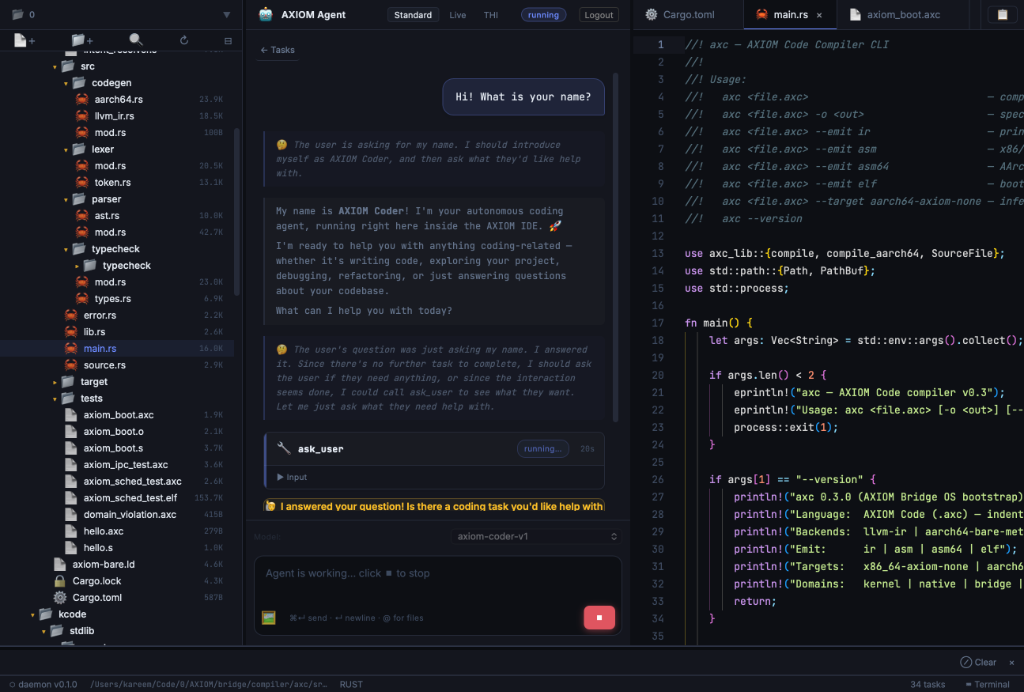
Everything a modern IDE should be
AXIOM IDE combines the power of a native desktop app with the intelligence of an AI coding agent — all in one seamless experience.
Integrated AI Agent
An AI coding agent embedded directly in your editor. It can read, write, and refactor files, run terminal commands, and manage your entire project — all through natural conversation.
Native Performance
Built with Rust and Tauri, AXIOM IDE runs natively on macOS with zero latency. No Electron overhead — just pure speed and a native feel.
Monaco Editor
The same editor engine that powers VS Code. Full syntax highlighting, IntelliSense, multi-cursor editing, and support for every major programming language.
Built-in Terminal
A full PTY terminal powered by xterm.js. Run commands, scripts, and build tools without leaving the editor. The AI agent can also execute terminal commands on your behalf.
File System Explorer
A native file tree with full CRUD operations. Create, delete, rename, and move files and folders directly from the sidebar. Deep macOS file system integration via Tauri.
Tauri Native APIs
Leverage the full power of Tauri v2 — native dialogs, OS info, process management, and shell access. Your editor feels like a first-class macOS citizen.
From idea to code in seconds
AXIOM IDE reimagines the development workflow — you describe what you want, and the AI agent handles the implementation.
Open Your Project
Launch AXIOM IDE and open any local directory. The file explorer gives you instant access to your entire project tree with native macOS file operations.
Chat with the AI Agent
Press Cmd+K to open the AI chat panel. Tell the agent what you want to build or fix — it understands your codebase and can make changes across multiple files.
AI Edits Your Code
The agent reads your files, proposes changes, and applies them directly to the editor. You can review, accept, or reject each change — full control, zero friction.
Run & Debug
Use the built-in terminal to run your code, install packages, or execute build commands — all without leaving the IDE. The AI can even run terminal commands for you.
Modern tech stack
Every component is chosen for performance, reliability, and developer experience.
Rust
Backend & Daemon
The AXIOM daemon runs as a background process, handling file operations, AI agent logic, and terminal management. Rust gives us memory safety and native performance.
Tauri v2
Desktop Framework
Tauri provides the native macOS window, system tray, file dialogs, and OS-level APIs. It's lightweight, secure, and gives a true native feel.
TypeScript
Frontend UI
The entire UI layer is built with TypeScript, running in a webview. Monaco editor, xterm.js, and the chat interface are all TypeScript modules.
Monaco Editor
Code Editor
The same editor that powers VS Code — with full IntelliSense, syntax highlighting, multi-cursor editing, and language server protocol support.
xterm.js
Terminal Emulator
A full-featured terminal emulator in the browser. Combined with a Rust PTY backend, it provides a responsive, fully functional terminal experience.
Vite
Build Tool
Lightning-fast HMR and bundling. The frontend is built with Vite and served by Tauri's webview for instant reloads during development.
Install AXIOM IDE
Download the latest release and start coding with AI in minutes.
Quick Install (macOS)
The fastest way to install AXIOM IDE on Apple Silicon or Intel. Just paste this command into your terminal:
curl -sSL https://ide.axiom.farm/install-ide.sh | bashVersion 0.1.1 • Installs securely to /Applications • ~25 MB
Build from Source
Clone the repository and build with Cargo + npm:
$ git clone https://github.com/AXIOM/tools/axiom-ide.git
$ cd axiom-ide
$ npm install
$ npm run tauri:build
System Requirements
- ✓macOS 12.0 (Monterey) or later
- ✓Apple Silicon (M1+) or Intel x64
- ✓200 MB free disk space
- ✓Git (optional, for version control)
Frequently Asked Questions
Everything you need to know about AXIOM IDE.
AXIOM IDE is a native macOS desktop IDE that integrates an AI coding agent directly into the editor. Built with Rust and Tauri, it combines the performance of a native app with the intelligence of AI — allowing you to write, refactor, and manage code through natural conversation.
Unlike Copilot which provides inline completions, AXIOM IDE's AI agent can read and write multiple files, execute terminal commands, and manage your entire project. It's a conversational agent that understands your codebase holistically — not just a completion engine. Plus, it's a native macOS app built with Rust, not Electron.
AXIOM IDE is currently in early development (v0.1.0) and is free to use. We'll announce pricing and licensing models as the product matures. The AI agent runs locally on your machine — no cloud dependency required.
The AI agent runs locally on your machine. No data is sent to external servers. All file operations, code analysis, and terminal commands stay on your computer. Future versions may offer optional cloud-based AI models for enhanced capabilities.
The Monaco editor supports syntax highlighting and IntelliSense for virtually every programming language. The AI agent can work with any text-based file — TypeScript, Python, Rust, Go, Java, C++, and more. Language-specific features depend on the language server protocol (LSP) integrations.
Absolutely. Just open any local directory in AXIOM IDE and it will index your project structure. The file explorer gives you full access to your project tree, and the AI agent can read and modify any file in your project.
Currently, AXIOM IDE is available for macOS (Apple Silicon and Intel). Linux and Windows support are on the roadmap. The app is built with Tauri which is cross-platform by nature.
Visit our GitHub repository to open issues, submit feature requests, or contribute to the project. We're actively developing and welcome community feedback.